The short answer
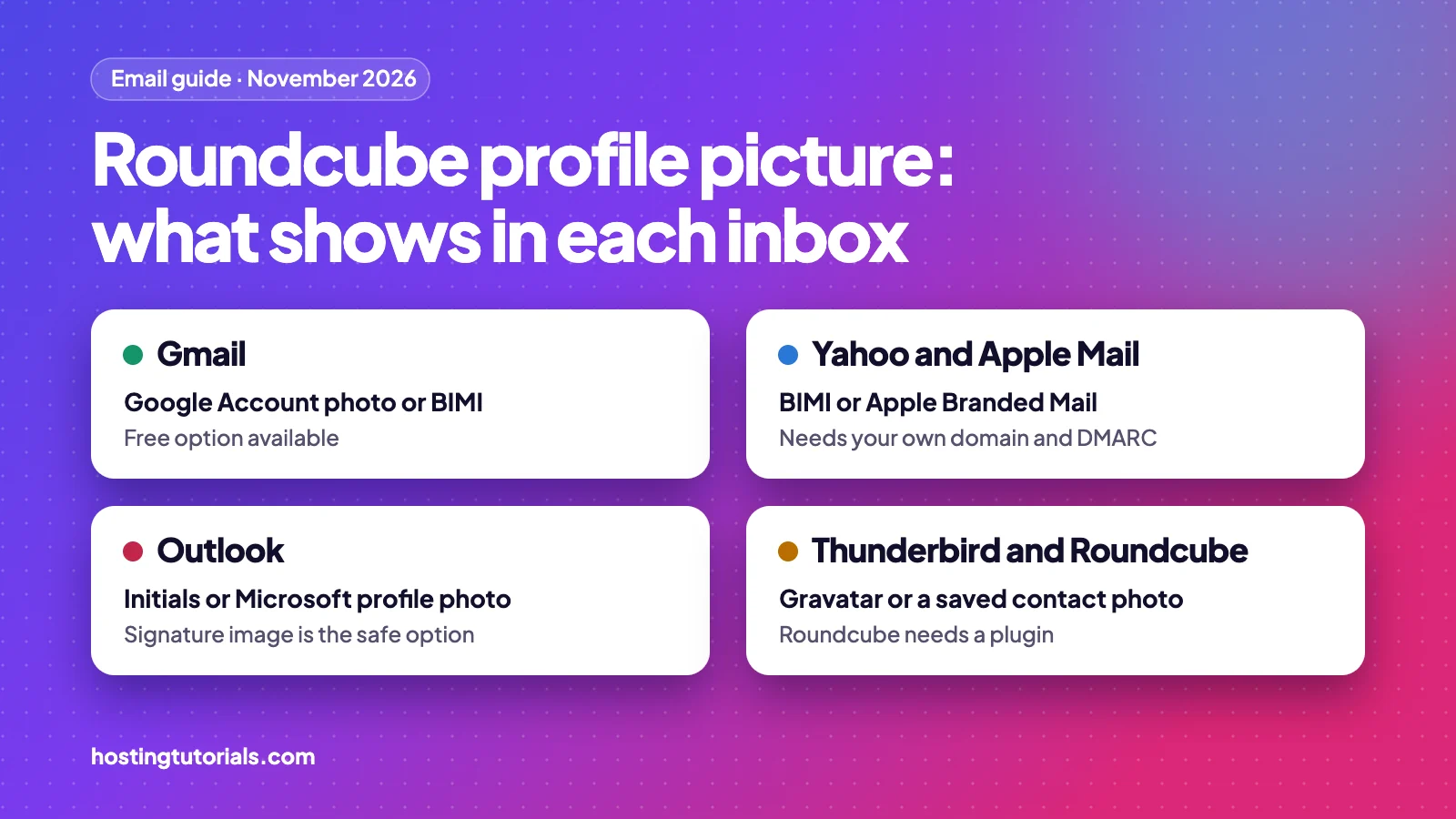
You cannot set a Roundcube profile picture that travels with your email, because Roundcube has no picture setting. Each mail service decides what to show beside your name. For the widest free coverage, link your address to a free Google Account for Gmail, add a Gravatar for apps such as Thunderbird, and put a small photo in your signature.
The same limit applies if you open Roundcube through cPanel or DirectAdmin webmail, or use a custom domain address.
What shows in each inbox
No single method reaches every inbox. This table shows what each mail service can display, and what you need for it.
| Where your email is read | What it can show | What you need |
|---|---|---|
| Gmail | Google Account photo or BIMI logo | A free Google Account on your address (Method 1) |
| Outlook | Initials, or a Microsoft profile photo | A Microsoft-hosted mailbox, otherwise use Method 2 |
| Yahoo | BIMI logo | Your own domain, DMARC and large mailings (Method 4) |
| Apple Mail | Saved contact photo, BIMI logo or Apple Branded Mail | A business domain with DMARC (Method 4) |
| Thunderbird, Spark, Airmail, Postbox | Gravatar | A free Gravatar account (Method 3) |
| Roundcube | Saved contact photo, or Gravatar with a plugin | Set up by the reader or their mail admin |
| Any inbox that shows images | A photo inside the message | An HTML signature (Method 2) |
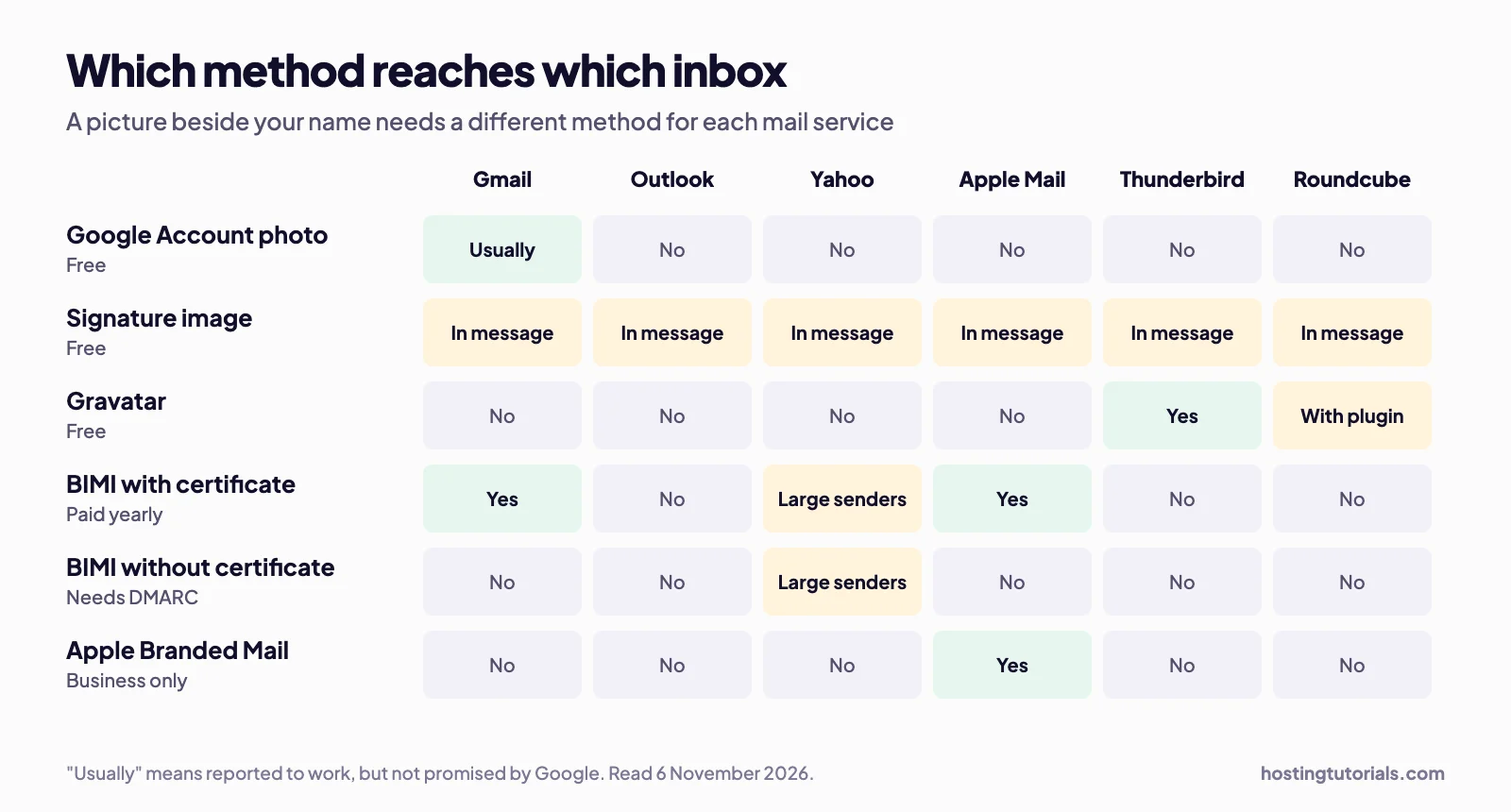
Our suggestion: start with Methods 1 and 2, which are free and take about 20 minutes. Add Method 3 if your contacts use desktop mail apps. Method 4 suits businesses that send a lot of email.
Why Roundcube has no profile picture setting
We checked the source code of Roundcube 1.7.5, the latest release on 6 November 2026. The identities table stores these fields, and none of them holds a picture:
identity_id, user_id, changed, del, standard, name, organization,
email, reply-to, bcc, signature, html_signature
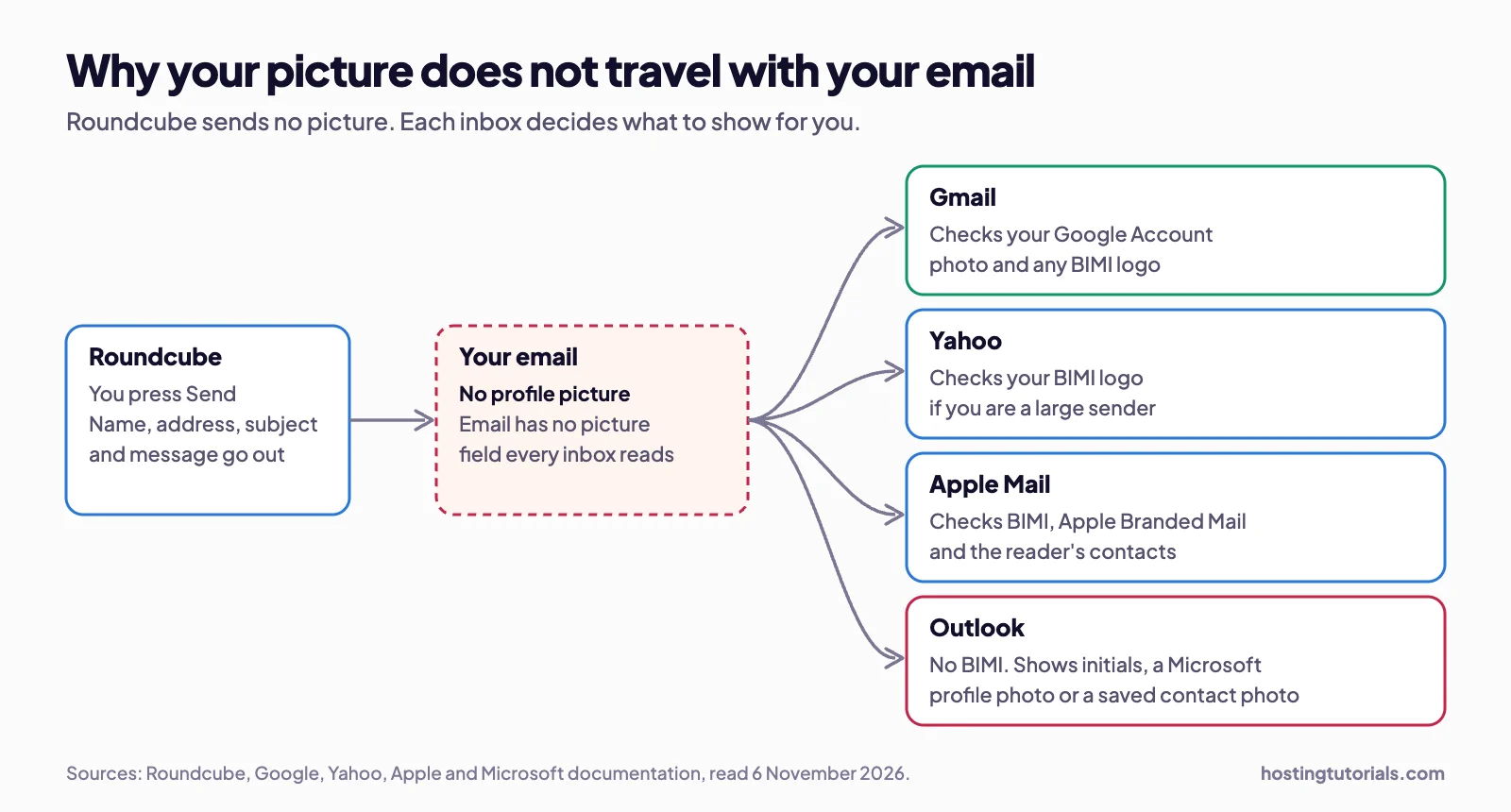
The identity form uses the same fields. We also searched the code that builds outgoing mail for picture, photo, avatar and BIMI, and found no matches. So there is nothing to attach, whichever host you use.
Roundcube does have contact photos, but they are not a profile picture. They sit in your own address book, so only you see them when that person emails you.
The wider reason is how email works. There is no picture field that every inbox reads. When your message arrives, the receiving service checks its own sources and decides what to show.
Method 1: Show your photo in Gmail with a Google Account
This is the best free option for a custom domain email address. Google lets you create an account with a non-Gmail address, which links your Roundcube address to a photo. Your mail stays with your current host, and you keep sending from Roundcube.
- Open a private browser window and go to Google Account sign-up.
- Choose For my personal use, and enter the same name you use in Roundcube.
- Click Use your existing email, then enter your Roundcube address.
- Find the verification code in Roundcube, and enter it on the Google page.
- Open your Google Account, click Personal info, then click Profile picture under Basic info.
- Upload a square photo, and click Save as profile picture.
- Send a test from Roundcube to a Gmail address.
Know the limits. This method worked in our own test. Google says your picture can appear next to your name for mail to other Gmail users, but it does not promise this for mail sent from another service. Email expert Al Iverson reported the method working, in his case after about 36 hours, and AgentMail documents the same approach. Resend says Gmail avatars appear in the mobile app and inside opened emails on desktop, so you may not see yours in the desktop inbox list. Your picture and name also become visible to other Google users.
Method 2: Add a photo to your Roundcube signature
This is the only method that reaches nearly everyone, including Outlook users. The photo sits inside the message rather than beside your name. Roundcube sends the image with your email.
- In Roundcube, go to Settings → Identities, and pick your identity.
- Turn on HTML signature, so that the signature box shows a formatting toolbar.
- Drag a small image from your computer into the signature box.
- Click Save, then send yourself a test.
You can also link to an image on your website using the source view in the editor. Replace the address and name with your own:
<img src="https://yourdomain.com/images/your-photo.png" width="64" height="64" alt="Your Name">Keep the image under about 100 pixels wide. Some mail apps hide images until the reader allows them, so always include your name as text too.
Method 3: Add a Gravatar for mail apps that read it
Gravatar links a picture to your email address, and apps look it up using a SHA-256 hash of your address. Resend lists Thunderbird, Airmail and Postbox as apps that rely on it, and Customer.io adds Spark. It also works across many websites.
- Go to gravatar.com and sign up with your Roundcube address.
- Confirm the address using the message sent to your inbox.
- Upload a square image.
- Choose the G rating, because only G-rated images show by default.
Gravatar will not change what Gmail shows. Some guides say your Gravatar appears in Gmail and Outlook, but Customer.io says Gmail does not use Gravatar directly, and we found no documentation saying Outlook does.
Show Gravatars inside Roundcube
If you run your own Roundcube, the unofficial Gravatar plugin shows these pictures in your webmail. Its author tested it on Roundcube 1.7.0. On shared hosting, your host would have to install it.
php composer.phar require "prodrigestivill/gravatar":"dev-master"Add gravatar as the last item in $config['plugins']. Each user then turns it on under Settings → Preferences → Address Book → Enable Gravatar.
The plugin uses an older MD5 hash by default, while Gravatar’s documentation describes SHA-256. On 6 November 2026, Gravatar answered both hash types for the same test address, so the plugin should still load pictures. A photo saved on a contact takes priority over Gravatar.
Can you show a profile picture in Outlook?
Not reliably from a Roundcube address. The BIMI Group lists Microsoft as not supporting BIMI, and a Microsoft support reply says it supports BIMI “as a sender, but not as a receiver”. That reply is not a product promise, and Suped reported in October 2026 that no date has been announced.
Customer.io says Outlook shows a Microsoft profile image from a Microsoft-hosted mailbox, which a typical hosting mailbox is not. Most Outlook users will therefore see your initials, or a photo they saved on your contact themselves.
You can try one free test. Create a Microsoft account with your address, then upload a picture on your Microsoft profile page. We have not tested this route ourselves, and we found no confirmation that Outlook users will see it for mail sent from another server, so check the result before you rely on it.
Method 4: Show your logo with BIMI or Apple Branded Mail
BIMI (Brand Indicators for Message Identification) lets your domain publish a logo that supporting inboxes show beside your email. It suits businesses, not personal photos. It works from your domain’s DNS, so it also covers mail sent through Roundcube.
You will see four technical terms:
- DMARC: a DNS record that tells inboxes what to do with mail that fails sender checks
- VMC (Verified Mark Certificate): a yearly certificate for a registered trademark logo
- CMC (Common Mark Certificate): a similar certificate for logos without a trademark
- PEM file: the file that holds your certificate and logo
| Requirement | Gmail | Yahoo | Apple Mail (BIMI) |
|---|---|---|---|
| DMARC | quarantine or reject, with pct at 100 | quarantine or reject | Strong authentication, including DMARC |
| Certificate | VMC or CMC | Not required | Verified logo, per the BIMI Group |
| Other conditions | SVG logo and PEM file | Large mailings with good reputation | iOS 16, iPadOS 16, macOS Ventura 13 or later, iCloud.com |
- Check that your mail passes SPF and DKIM. In cPanel, use the Email Deliverability tool.
- Publish a DMARC record, and move it to
quarantineorrejectonce your mail passes. - Prepare a square logo in SVG Tiny PS format, on a solid background. Google asks for at least 96 pixels, and recommends 32 KB or less.
- Buy a certificate from an approved issuer. A VMC needs a registered trademark, which Google says can take 6 to 12 months.
- Host the PEM file on HTTPS, and add the DNS record below.
Google gives this format for the TXT record:
Host:   default._bimi.yourdomain.com
Value:  v=BIMI1;l=;a=https://yourdomain.com/brand/certificate.pem
A DMARC record that meets the requirement looks like this:
Host:   _dmarc.yourdomain.com
Value:  v=DMARC1; p=quarantine; pct=100; rua=mailto:dmarc@yourdomain.com
You can look up any company’s record to see a working example. This is eBay’s, as read on 6 November 2026:
$ dig +short TXT default._bimi.ebay.com
"v=BIMI1;l=https://vmc.digicert.com/9e57aa28-3230-463f-b92e-ba8cd5612c17.svg;a=https://vmc.digicert.com/9e57aa28-3230-463f-b92e-ba8cd5612c17.pem"
What it costs: Suped’s price list starts at about $900 a year for a VMC and $750 for a CMC, before any trademark costs. Certificates last 398 days at most, so plan to renew each year. Google says your logo can take up to 48 hours to appear. Fastmail, Zoho Mail and Comcast also support BIMI.
Apple Branded Mail: no certificate needed
Apple also offers its own option. Resend explains that Apple Branded Mail shows your logo in Apple Mail without a certificate, and accepts PNG, HEIF and JPG files. You need an Apple Business account, DMARC and a company identification number. It works only in recent versions of Apple Mail, so it does not replace the other methods.
Does this work in cPanel and DirectAdmin webmail?
Yes. cPanel and DirectAdmin both offer the same Roundcube app, so the same limits and steps apply. In cPanel, open Email Accounts, click Check Email beside your address, then choose Roundcube. In DirectAdmin, open your webmail link and log in with your email address. Your control panel has no profile picture setting for outgoing mail either.
What size should your email picture be?
Start from a square image at least 512 pixels wide. Inboxes shrink it, so check that it stays clear at 40 pixels.
- Face or simple logo: fine detail disappears at small sizes
- Solid background: transparent logos may not display as expected
- Same image everywhere: people recognise you faster
- BIMI logo: at least 96 pixels, in SVG Tiny PS format
- Signature image: about 64 to 100 pixels wide
How to test your Roundcube profile picture
- Send a message from Roundcube to free Gmail, Yahoo, Outlook.com and iCloud addresses.
- Open each one on a phone and on a computer, because apps show different things.
- In Gmail, open the message menu and choose Show original.
- Look for PASS beside SPF, DKIM and DMARC.
- Wait up to 48 hours before changing anything, because pictures can take time to appear.
If your picture does not show
| Problem | Likely cause | Fix |
|---|---|---|
| Gmail shows your initial | Still updating, or a different address | Wait, then check the Google Account uses your exact sending address |
| No picture in the Gmail desktop list | Gmail shows avatars in fewer places on desktop | Open the message, or check the mobile app |
| Picture shows in Gmail only | This is normal | Add the other methods for other inboxes |
| No BIMI logo in Gmail | DMARC is none, or pct is below 100 | Set quarantine or reject at 100 |
| No BIMI logo in Yahoo | Not enough volume or reputation | Yahoo shows logos for large mailings with good reputation |
| Signature image is missing | The reader blocks images | Keep your name as text, and use an HTTPS image |
| Old picture still shows | The picture is cached | Allow extra time, then test in a new conversation |
What to do next
- Today: create the Google Account and upload your photo.
- Today: add a small photo to your Roundcube signature.
- This week: test from Roundcube using the steps above.
- If your contacts use desktop mail apps: set up Gravatar.
- If you run a brand: get DMARC working, then price BIMI.
Frequently asked questions
Can I set a profile picture in Roundcube?
No. Roundcube identities have no picture field, so nothing is sent with your email. You can add a photo to a contact, but only you see that. To show a picture to others, use the service each reader uses, such as a Google Account for Gmail.
How do I add a profile picture to cPanel webmail?
cPanel webmail has no profile picture setting for outgoing mail, because it uses apps such as Roundcube. Create a free Google Account with your address for Gmail readers, then add a small image to your HTML signature for everyone else.
Why does my picture show in Gmail but not Outlook?
Each mail service chooses its own picture source. Gmail can use a Google Account photo or a BIMI logo. Outlook does not display BIMI logos, so its users normally see your initials or a photo they saved themselves.
Does Gravatar show in Gmail or Outlook?
We found no documentation saying it does, and Customer.io says Gmail does not use Gravatar directly. Gravatar works in apps that support it, such as Thunderbird, and in Roundcube if an administrator installs a plugin.
Do I need to move my email to Gmail?
No. A Google Account can use your existing address, and your mail stays with your current host. You keep sending and receiving in Roundcube. The account only links your address to a profile picture that Gmail can show.
How long does a new email profile picture take to appear?
It varies. Google says that picture changes can take some time, and one email expert saw about 36 hours. Google says BIMI logos can take up to 48 hours. Check again after two days before you change anything.
What size should an email profile picture be?
Start from a square image at least 512 pixels wide, and check that it stays clear at 40 pixels. Use a solid background. A BIMI logo needs at least 96 pixels, and a signature image works best at 64 to 100 pixels wide.
Is BIMI worth it for a small business?
Usually not at first. BIMI needs your own domain, a strict DMARC policy, a special SVG logo and normally a paid yearly certificate from about $750. Start with the free methods, then consider it if you send a lot of email.
How we made this guide
Who: the HostingTutorials team. How: on 6 November 2026 we read the Roundcube 1.7.5 source code, documentation from the mail services, and guides from email specialists, all listed below. We also looked up live DNS records and checked the Gravatar service directly. What we tested: we tried the Google Account, signature and Gravatar methods ourselves. We did not test the Microsoft account route or BIMI, so results there can differ. An AI assistant helped with research, drafting and the diagrams, and a person reviewed the final article. Why: many Roundcube users look for a picture setting that does not exist, and the real answer is spread across many help pages.
Mail services change often. If something here is out of date or wrong, tell us on our contact page and we will correct it and note the date. Read more about how we write our guides.
Sources
- Roundcube 1.7.5 source: identities table, identity form and outgoing mail
- Roundcube help: Identities and signatures and contact photos
- Google: Create a Google Account, change your profile picture and Gmail profile pictures
- Google: Set up BIMI and add a BIMI TXT record
- Yahoo: BIMI requirements and Apple: BIMI support in Mail
- BIMI Group: Supporting mailbox providers and FAQ for senders
- Microsoft Q&A: Exchange Online and BIMI and create a Microsoft account
- Resend: Sending with an avatar and Apple Branded Mail
- Customer.io: Adding a sender image and AgentMail: Inbox profile pictures
- Al Iverson, Spam Resource: Brand icons in Gmail and Suped on Outlook and BIMI
- Gravatar: Email hashes, avatar images and Roundcube Gravatar plugin (unofficial)
- Suped: BIMI certificate prices